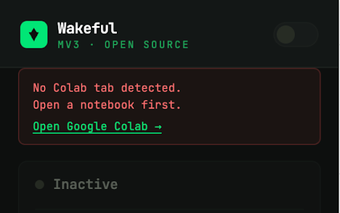
Wakeful by independent developers is a Chrome extension that gives users in-browser control over system power behavior for short, focused tasks. The extension offers a toolbar toggle plus timed sessions to prevent the system from sleeping or dimming without changing OS settings. Key controls include one-click activation, preset intervals, a visible toolbar indicator, and automatic return to default power rules. It targets people who need temporary uptime without installing system utilities.
What is Wakeful used for?
Wakeful keeps a workstation active from inside the browser, preventing sleep, display dimming, and screensaver activation during important activities. The extension exposes a direct toolbar toggle and timed "Keep Awake" sessions so users do not open system control panels. Its main interaction model is one-click activation and preset timers, which makes it easy to require uninterrupted uptime for a defined period.
How much memory and CPU does Wakeful use?
The extension maintains a minimal runtime profile and is described as having an extremely low resource footprint compared with standalone "caffeine" applications. Because Wakeful operates inside the browser process and uses a minimalist interface, it avoids adding a persistent separate service. This design reduces overhead on systems where users prefer a light browser-based utility over a resident desktop program.
Does Wakeful collect or share browsing data?
Wakeful interacts with the platform through standard Chrome APIs to request power management overrides, which is different from extensions that harvest browsing history or tabs. The developer publishes it as a utility maintained by independent developers, and guidance in the extension notes suggests checking workplace IT policy before installing. That recommendation acknowledges corporate controls while indicating the extension itself uses official browser interfaces.
Does Wakeful work across browsers and devices?
The extension supports Chromium-based browsers on major desktop platforms, including Chrome, Edge, Brave, Opera, and Vivaldi on Windows, macOS, and Linux. Functionality depends on the browser process remaining active; if all browser windows close and background apps are not allowed, the keep-awake effect can stop. The toolbar status indicator helps confirm whether a timed session or manual override is currently active.
Wakeful is a practical browser-centric choice for time-limited uptime control
Wakeful suits users who prefer managing temporary power overrides from the browser rather than altering system settings. It serves well for short sessions that require continuous activity, but it is not a substitute for system-level power management when persistent changes are needed. As a practical tip, enable your browser's background process setting when you rely on the extension for extended monitoring.
Pros
One-click activation for immediate keep-awake control
Laws concerning the use of this software vary from country to country. We do not encourage or condone the use of this program if it is in violation of these laws. Softonic may receive a referral fee if you click or buy any of the products featured here.